
Tech
എത്ര റീലുകൾ ചെയ്തിട്ടും റീച്ച് കിട്ടുന്നില്ലേ? ഈ കാര്യങ്ങൾ ചെയ്ത് നോക്കൂ… നിങ്ങളുടെ റീലും വൈറലാകും


സോഷ്യൽ മീഡിയ ഇന്ന് വിനോദത്തിന് മാത്രമുള്ള വേദിയല്ല. ശരിയായി ഉപയോഗിച്ചാൽ നല്ല വരുമാനം നേടാനും വ്യക്തിഗത ബ്രാൻഡിംഗ് ശക്തിപ്പെടുത്താനും കഴിയുന്ന പ്ലാറ്റ്ഫോമാണ് ഇൻസ്റ്റഗ്രാം. റീൽസ് ചെയ്ത് പണം സമ്പാദിക്കുന്നവരുടെ എണ്ണം ദിനംപ്രതി വർധിക്കുകയാണ്. എന്നാൽ നിങ്ങൾ സമയം എടുത്ത് എഡിറ്റ് ചെയ്ത റീൽ… നല്ല കണ്ടന്റ്… ട്രെൻഡിംഗ് ഓഡിയോ… എന്നിട്ടും വ്യൂസ് വളരെ കുറവാണോ? പ്രശ്നം നിങ്ങൾ ചെയ്യുന്ന ശ്രമത്തിൽ അല്ല, റീൽ അവതരിപ്പിക്കുന്ന രീതിയിലാണ്. ഇൻസ്റ്റഗ്രാം റീലുകൾ വൈറലാകുന്നത് ഭാഗ്യം കൊണ്ടല്ല, ചില ചെറിയ നിയമങ്ങൾ കൃത്യമായി പാലിച്ചാൽ മതി.
റീലിന്റെ ദൈർഘ്യം, ഉള്ളടക്കത്തിന്റെ അവതരണം, പ്രേക്ഷകരെ പിടിച്ചിരുത്തുന്ന രീതിയൊക്കെ റീലുകൾ വൈറലാകുന്നത്തിന്റെ പ്രധാന ഘടകങ്ങൾ ആണ്.
റീലിന്റെ ദൈർഘ്യത്തിലും ശ്രദ്ധ വേണം;
ഇൻസ്റ്റഗ്രാം ഔദ്യോഗികമായി റീലുകൾക്ക് കുറഞ്ഞ ദൈർഘ്യം നിശ്ചയിച്ചിട്ടില്ല. മൂന്ന് സെക്കൻഡ് റീൽ പോലും അപ്ലോഡ് ചെയ്യാം. എന്നാൽ മൂന്ന് മുതൽ അഞ്ച് സെക്കൻഡ് വരെ ഉള്ള റീലുകൾക്ക് സാധാരണയായി മികച്ച റീച്ച് ലഭിക്കാറില്ല. ഏഴ് മുതൽ 15 സെക്കൻഡ് വരെയുള്ള റീലുകളാണ് കൂടുതൽ ഫലപ്രദം. ഈ ദൈർഘ്യത്തിൽ വാച്ച് ടൈം ഉയരുകയും വൈറലാകാനുള്ള സാധ്യത വർധിക്കുകയും ചെയ്യും. പുതിയതായി റീൽ ചെയ്യുന്നവർ 10–15 സെക്കൻഡ് ഉള്ള റീലുകൾ ചെയ്യുന്നതാണ് നല്ലത്.
ഇൻസ്റ്റഗ്രാം അൽഗോരിതം പ്രധാനമായും രണ്ട് കാര്യങ്ങളാണ് പരിശോധിക്കുന്നത്.
1. ഉപയോക്താവ് എത്ര സമയം റീൽ കാണുന്നു എന്നത്.
2. റീൽ പൂർണ്ണമായി കാണുന്നുണ്ടോ എന്നത്.
ചെറിയ ദൈർഘ്യമുള്ള റീലുകൾ മിക്കവരും മുഴുവൻ കാണുകയും പലപ്പോഴും ഓട്ടോമാറ്റിക്കായി വീണ്ടും പ്ലേ ആകുകയും ചെയ്യും. ഇതോടെ വാച്ച് ടൈം വർധിക്കും. അതുകൊണ്ടാണ് ഏഴ് മുതൽ 15 സെക്കൻഡ് വരെയുള്ള റീലുകൾക്ക് കൂടുതലായി റീച്ച് ലഭിക്കുന്നത്. എന്നാൽ ദൈർഘ്യം മാത്രം പോര, ഉള്ളടക്കം ആകർഷകമായിരിക്കണം.
ആദ്യ മൂന്ന് സെക്കൻഡ് വളരെ പ്രധാനമാണ്
റീൽ ആരംഭിച്ച ആദ്യ 2–3 സെക്കൻഡിനുള്ളിൽ തന്നെ പ്രേക്ഷകൻ തീരുമാനിക്കും, കാണണോ സ്ക്രോൾ ചെയ്യണോ എന്ന്. അതിനാൽ “ഹായ് ഫ്രണ്ട്സ്”, പേര് പറയൽ, ലോഗോ കാണിക്കൽ തുടങ്ങിയ ആമുഖങ്ങൾ ഒഴിവാക്കുന്നതാണ് നല്ലത്. പകരം, ഒരു ചോദ്യം ചോദിക്കുക, ഞെട്ടിക്കുന്ന ഒരു വസ്തുത പറയുക, അല്ലെങ്കിൽ അവസാന ഫലം ആദ്യം തന്നെ കാണിക്കുക. ഇത് പ്രേക്ഷകന്റെ ശ്രദ്ധ പിടിച്ചിരുത്തും.
റീലിലൂടെ എന്തെങ്കിലും പഠിപ്പിക്കാനോ ടിപ്പുകൾ നൽകാനോ ചെറിയൊരു കഥ പറയാനോ ഉദ്ദേശിക്കുന്നുവെങ്കിൽ 15 മുതൽ 30 സെക്കൻഡ് വരെയുള്ള ദൈർഘ്യം മികച്ചതാണ്.
സ്കിൻ കെയർ, ഫിറ്റ്നസ്, ഓൺലൈൻ വരുമാനം, മോട്ടിവേഷൻ, ചെറിയ ട്യൂട്ടോറിയലുകൾ എന്നിവക്ക് ഈ സമയം അനുയോജ്യമാണ്. ഓരോ 2–3 സെക്കൻഡിലും വിഷ്വൽ മാറ്റങ്ങൾ നൽകണം. ദൈർഘ്യമേറിയ റീലുകൾ ശക്തമായ ഉള്ളടhttps://www.youtube.com/watch?v=p5XTBTLeM7cക്കമുള്ളപ്പോൾ മാത്രം പരീക്ഷിക്കുക.
റീൽ വൈറലാകാൻ ശ്രദ്ധിക്കേണ്ട പ്രധാന ടിപ്പുകൾ
റീൽ ആരംഭിക്കുന്ന ആദ്യ മൂന്ന് സെക്കൻഡിൽ തന്നെ പ്രേക്ഷകനെ പിടിച്ചിരുത്തുന്ന എന്തെങ്കിലും നൽകുക.
റീലിൽ നിർബന്ധമായും ടെക്സ്റ്റ് ചേർക്കുക, കാരണം പലരും ശബ്ദമില്ലാതെയാണ് റീലുകൾ കാണുന്നത്.
ഓരോ 2–3 സെക്കൻഡിലും ഫ്രെയിം അല്ലെങ്കിൽ ഷോട്ട് മാറ്റുക.
എപ്പോഴും വെർട്ടിക്കൽ ഫോർമാറ്റ് ഉപയോഗിക്കുക.
ട്രെൻഡിംഗ് ഓഡിയോ അല്ലെങ്കിൽ വ്യക്തമായ വോയിസ് ഓവർ തിരഞ്ഞെടുക്കുക.
ഇതിനെല്ലാം പുറമെ, പ്രേക്ഷകർ കൂടുതൽ സജീവമായ സമയങ്ങളിൽ റീൽ പോസ്റ്റ് ചെയ്യുന്നതും റീച്ച് വർധിക്കാൻ സഹായിക്കും.
Sources:mediamangalam
Instagram looks at a bunch of information to decide which videos to recommend to the users. It pays attention to how they use the app, like if they “like” or comment on videos. This helps them understand what kind of videos people might be interested in. It also looks at what videos you’ve watched in the past because that gives clues about what you might like.
The algorithm also looks at details about the videos themselves. It pays attention to things like the music or sound in the video, the images or pictures, and how popular the video is. All of these things help Instagram decide if a video is a good match for you.
Lastly, Instagram wants to give a chance to all the people who create videos, so they also consider how popular the person who made the video is. They want to help smaller creators get more attention and find their audience.
So, basically, the Instagram Reels algorithm tries to show you videos that you’ll find entertaining and enjoyable based on what you’ve liked in the past and other factors like the content of the videos and the popularity of the creators.
Overall, the Instagram reel algorithm is likely to consider key factors such as…
User Activity in the form of likes or comments
Past Interactions
Reels elements like audio and visual content
The Popularity of the Creator
Ensure Your Video Is High-Quality
To make your Instagram Reel stand out and have a better chance of going viral, it’s important to focus on the quality of your video.
While not all successful reels are professionally edited, the key factor that distinguishes viral ones from non-viral ones is the video’s quality.
A high-quality video typically has two main elements: good lighting and high resolution. When using your phone to record, ensure that you have enough light available. If you’re shooting indoors, you might want to invest in a ring light, which helps soften shadows and improves the overall image.
On the other hand, if you’re filming outside, try to choose times of the day when sunlight is less intense, or avoid shooting directly in the sun. These steps will contribute to a better-looking video.
On the other hand, if you’re filming outside, try to choose times of the day when sunlight is less intense, or avoid shooting directly in the sun. These steps will contribute to a better-looking video.
Use Trending Music
Look for songs that are currently popular and trending. If you know of a song that is gaining a lot of attention and has the potential to go viral, go ahead and use it in your Reel. If you can’t find a trending song, just pick one that fits well with the theme of your video.
Adding music to your Reels helps you stay up-to-date with what’s popular and happening.
It also increases your chances of being discovered by more people on the platform. Additionally, you can participate in exciting challenges that Instagram introduces from time to time, which adds a fun and interactive element to your Reels.
Use Creative Transitions:
Transitions are like magic tricks that help you smoothly move from one character/thing to another. They make your videos look professional and captivating. Not only that, but transitions also help tell a story and make your content stand out.
Imagine you’re creating a fashion or makeup Reel. Instead of abruptly changing your outfit or makeup in each clip, focus on creating smooth transitions. For example, you can try the “jump cut” technique where you quickly change your clothes or makeup between cuts, giving the illusion of a seamless transformation.
Another idea is to use creative transitions like swipes, spins, or fades to transition between different scenes or actions. These techniques add a touch of excitement and make your video more visually appealing.
Don’t Remove Low-Performing Reels:
When your reel doesn’t do as well as you hoped, it’s not necessarily a reason to hit the delete button. Why? Well, the Instagram reels algorithm works in mysterious ways. It takes some time for your reel to gain traction and for the algorithm to work its magic.
You see, the algorithm uses certain rules and criteria to determine the visibility and reach of your Reel.
Sometimes, the positive effects of these algorithms may not show up right away. So, it’s important to be patient and give your low-performing reel some time.
Believe it or not, some reels that initially don’t do well can suddenly blow up after 2 to 3 weeks.
It’s like they need a little extra time to gather momentum and catch the attention of more viewers.
Instead of deleting your Reel right away, give it a chance. Keep promoting it, engage with your audience, and see if it starts gaining more views and engagement over time. You never know when it might turn into a surprise hit!
Follow the Community Guidelines:
As a creator on Instagram, it’s your responsibility to stay up-to-date with the Instagram community guidelines. Make sure you understand them and follow them closely. Create content that is respectful, positive, and aligns with Instagram’s rules. This way, you can focus on sharing your creativity and engaging with your audience without any unnecessary trouble.
Here are some key things to keep in mind:
Don’t use someone else’s content without permission. It’s important to give credit where it’s due and avoid copyright infringement.
Unless it’s for educational or medical purposes, steer clear of posting content that includes nudity. Instagram wants to keep the platform safe and comfortable for all users.
Avoid creating content on terrorism, bigotry, organized crime, hate groups, and fake news: These topics promote negativity and harm. It’s best to stay away from spreading hate or misinformation.
Add Closed Captions:
Many Instagram users watch videos without sound.
That’s why it’s a great idea to provide captions or text in your Reels. It helps those viewers understand your content even if there is no audio. Plus, it’s also beneficial for people who are hard of hearing, as it allows them to fully engage with your video.
Some influencers on Instagram may find it challenging to create captions that capture the mood of their videos or convey important information. As a result, they may even skip captions altogether.
But here’s the thing: when you put in the extra effort to include captions, it not only makes your Reels more discoverable, but it also increases engagement.
By adding video captions, you’re enabling users to search for keywords that appear in those captions. This means they’re not limited to searching for hashtags or picture captions. The added searchability factor can help your Reels go viral, reaching a wider audience and gaining more attention.
Share it On Your Feed and Stories:
By sharing your Reel on your feed, you ensure that your followers won’t miss out on your awesome content. They’ll be able to see it alongside your regular posts.
But here’s the exciting part: sharing your Reels on your feed also increases your chances of getting featured on the Explore page. The Explore page is where Instagram showcases content to users who might be interested in it, even if they don’t follow you. When your Reel appears on the Explore page, it can attract more likes, comments, and shares, giving your Reel a real boost.
Don’t Forget to Use Hashtags (But Choose them Carefully):
Hashtags play a crucial role in getting your content noticed on Instagram. They help Instagram’s algorithm understand the type of content you’re sharing, which in turn helps it show your video to users who may be interested in it.
When it comes to choosing hashtags, it’s important to be strategic. While popular hashtags might seem tempting, they often have a lot of competition. Instead, focus on selecting hashtags that are relevant to your content and have a decent following but aren’t overly saturated.
For example, if you’re sharing a Reel about baking cookies, it’s better to use hashtags like #homemadecookies, #bakinglove, or #cookietime, rather than using extremely popular hashtags like #bestcookie or #dessert. By using more specific and targeted hashtags, you increase your chances of reaching the right audience who are genuinely interested in your content.
Take some time to research hashtags that align with your content and have a moderate following. This way, you’ll strike a balance between visibility and competition. You can also experiment with a mix of broad and niche hashtags to expand your reach while still targeting specific interests.
Prefer Shooting Vertically:
When it comes to shooting Reels, it’s ideal to shoot and upload your videos vertically. Why? Well, when you shoot vertically, your video will take up the entire screen of a mobile device.
This provides a better viewing experience for your audience since most people use their phones to browse Instagram. So, remember to hold your phone upright while shooting your Reels to make the most of the screen space.
Create a Custom Cover Image:
Creating a custom cover image for your Reel can make it stand out and catch the attention of viewers. Think of it as a thumbnail or a cover page for your video. It gives your Reel a distinct identity and makes it more eye-catching when people come across it.
When creating your custom cover, make sure it matches the format you’re shooting your video in. So, if you’re shooting vertically, design your cover in the vertical format as well. This ensures consistency and gives viewers a preview of what they can expect when they click on your Reel.
Use eye-catching visuals, bold text, or an intriguing image that represents your video’s content. The goal is to make your Reel cover visually appealing and enticing, so people are more likely to click and watch your video.
Learn the Schedule for Posting Reels:
Maintain the Posting Consistency:
Consistency is key when it comes to the success of your Instagram Reels. That’s why it’s important to think about your posting schedule, the duration of each post, and the type of content you’re sharing.
When you post Reels frequently, the algorithm interprets it as you being an active and consistent content creator. This increases your chances of appearing on the Reels tab, the Explore page, and even in the regular feeds of users. In other words, posting Reels consistently can make a real difference in reaching new audiences and gaining more visibility.
http://theendtimeradio.com


Tech
മറ്റുള്ളവർ ടാഗ് ചെയ്ത പോസ്റ്റുകൾ ഇനി സ്വന്തം പ്രൊഫൈൽ ഗ്രിഡിൽ; ഇൻസ്റ്റഗ്രാമിന്റെ പുതിയ ഫീച്ചർ എത്തി
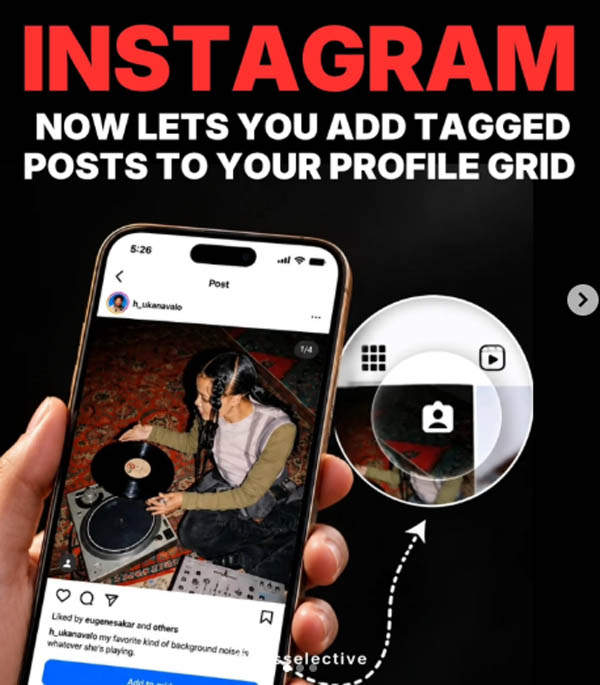
ഇൻസ്റ്റഗ്രാമിൽ മറ്റുള്ളവർ പങ്കുവെച്ച് നമ്മളെ ടാഗ് ചെയ്ത പോസ്റ്റുകൾ സ്വന്തം പ്രൊഫൈലിൽ കൂടുതൽ പ്രാധാന്യത്തോടെ പ്രദർശിപ്പിക്കാനുള്ള അവസരം ഇനി ഉപയോക്താക്കൾക്ക്. ടാഗ് ചെയ്ത പോസ്റ്റുകൾ നേരിട്ട് പ്രൊഫൈൽ ഗ്രിഡിൽ ഉൾപ്പെടുത്താൻ കഴിയുന്ന പുതിയ ഫീച്ചർ ഇൻസ്റ്റഗ്രാം മേധാവി ആദം മൊസ്സേരി ആഗോളതലത്തിൽ അവതരിപ്പിച്ചു.
ടാഗ് ചെയ്യപ്പെടുന്ന പോസ്റ്റുകൾ പ്രൊഫൈലിന്റെ പ്രധാന ഗ്രിഡിലേക്ക് ചേർക്കാൻ മൂന്ന് മാർഗങ്ങളാണ് ഇൻസ്റ്റഗ്രാം ഒരുക്കിയിരിക്കുന്നത്.
1 . ടാഗ് ചെയ്തതായി ലഭിക്കുന്ന ഡയറക്റ്റ് മെസേജ് നോട്ടിഫിക്കേഷനിൽനിന്ന് നേരിട്ട് പോസ്റ്റ് ഗ്രിഡിലേക്ക് ചേർക്കാം.
2. ടാഗ് ചെയ്ത പോസ്റ്റിലെ ത്രീ-ഡോട്ട് മെനുവിലൂടെ.
3. ‘ടാഗ്ഡ്’ ടാബിൽ പോസ്റ്റ് അമർത്തിപ്പിടിച്ചും ഈ ഓപ്ഷൻ ഉപയോഗിക്കാം.
പോസ്റ്റ് പ്രധാന പ്രൊഫൈൽ ഗ്രിഡിലേക്ക് ചേർത്താലും യഥാർത്ഥ പോസ്റ്റിന് മാറ്റമുണ്ടാകില്ല. അതുപോലെ തന്നെ പ്രൊഫൈലിലെ ‘ടാഗ്ഡ്’ സെക്ഷനിലും പോസ്റ്റ് തുടരും. പിന്നീട് പ്രധാന ഗ്രിഡിൽനിന്ന് ഒരു പോസ്റ്റ് നീക്കം ചെയ്താലും അത് യഥാർത്ഥമായി അപ്ലോഡ് ചെയ്ത വ്യക്തിയുടെ പോസ്റ്റിൽനിന്ന് ഡിലീറ്റ് ചെയ്യപ്പെടില്ല.
പുതുതായി ഗ്രിഡിൽ ചേർക്കുന്ന ടാഗ് ചെയ്ത പോസ്റ്റുകൾ ഡിഫോൾട്ടായി റിവേഴ്സ്-ക്രോണോളജിക്കൽ ക്രമത്തിലാണ് ദൃശ്യമാകുക. അതേസമയം, നേരത്തെ തന്നെ സ്വന്തം പ്രൊഫൈൽ ഗ്രിഡിന്റെ ലേഔട്ട് ക്രമീകരിച്ചിട്ടുള്ള ഉപയോക്താക്കളുടെ നിലവിലെ ലേഔട്ടിൽ ഈ ഫീച്ചർ സ്വമേധയാ മാറ്റം വരുത്തില്ല.
ക്രിയേറ്റർ കൊളാബറേഷനുകൾ, സുഹൃത്തുക്കൾ പങ്കുവെക്കുന്ന ഗ്രൂപ്പ് ചിത്രങ്ങൾ, മറ്റ് ടാഗ് ചെയ്ത കണ്ടന്റുകൾ എന്നിവ സ്വന്തം പ്രൊഫൈൽ ഗ്രിഡിൽ പ്രദർശിപ്പിക്കാൻ പുതിയ ഫീച്ചർ സഹായിക്കും. ഇതിലൂടെ ഇത്തരം പോസ്റ്റുകൾ സ്വന്തം ഫോളോവർമാരിലേക്കും കൂടുതൽ എളുപ്പത്തിൽ എത്തിക്കാനാകും. പ്രൊഫൈലിൽ കാണിക്കേണ്ട ടാഗ് ചെയ്ത പോസ്റ്റുകൾ തിരഞ്ഞെടുക്കാനുള്ള കൂടുതൽ നിയന്ത്രണമാണ് പുതിയ ഫീച്ചറിലൂടെ ഇൻസ്റ്റഗ്രാം ഉപയോക്താക്കൾക്ക് ലഭിക്കുന്നത്.
Sources:mediamangalam
Instagram is making it easier to customise how your profile looks with a new feature. Users can now bring posts they are tagged in directly to their main profile grid instead of keeping them only in the dedicated Tagged section. The feature is rolling out globally and can be useful for group photos, collaborations, and other shared moments.
How to add tagged posts to your Instagram grid
There are three ways to add a tagged post to the main profile grid. Users can do it directly from the DM notification received after being tagged, open the three-dot menu on the tagged post, or press and hold the post from the Tagged tab on their profile.
Once added, the post will appear on the main grid based on the original post’s date, with the newest content generally appearing first. However, users who have customised their profile arrangement can place the tagged post according to their preferred grid layout.
The feature also gives users the flexibility to change their minds later. A tagged post can be removed from the main grid at any time without deleting the original post. It will also remain available in the user’s Tagged section after being removed from the primary grid.
More ways to customise Instagram profiles
The new option could be particularly useful for creators who want to showcase collaborations without uploading the same content again. It can also help people bring memorable group photos, holiday pictures, and other posts shared by friends into their main profile.
Instagram has been adding more profile and content management tools in recent months. In June, the platform introduced the ability to reorder posts on the main grid, giving users more control over the arrangement of their profile. It has also added editing tools such as First Draft for Reels and Replace Audio for changing music on existing posts.
The tagged-post feature is now rolling out globally, giving users another way to decide what appears on their profiles.
http://theendtimeradio.com
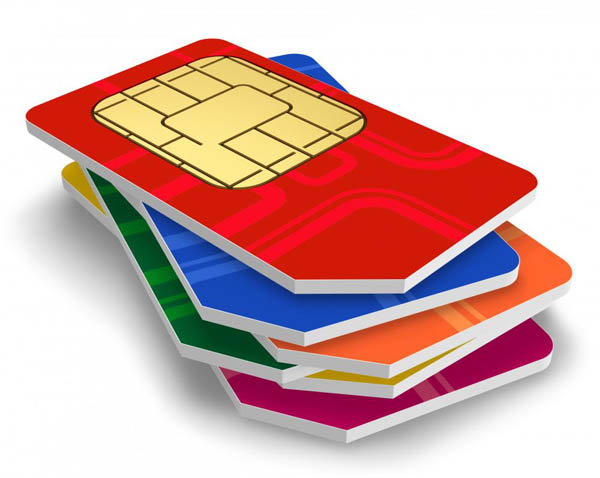
സിം കാര്ഡിന്റെ നാലുമൂലകളില് ഒരു മൂലയില് ഒരു വെട്ട് കണ്ടിട്ടില്ലേ? അതെന്തിനാണെന്ന് അറിയാമോ? ചില കാര്യങ്ങള് അങ്ങനെയാണ് നിത്യമുപയോഗിക്കുന്ന പല സംഗതികളുടെയും കൃത്യമായ ഒരു ചിത്രം നമുക്ക് അറിയില്ല. മുറിഞ്ഞുപോയ പോലെ കാണുന്ന ആ ഡിസൈനിന് പിന്നിൽ ഒരു കാരണമുണ്ട്. അത് എന്തിനാണെന്ന് 99 ശതമാനം പേര്ക്കും അറിയില്ല. അതറിയാൻ ആണെങ്കിൽ നമ്മൾ ശ്രമിച്ചിട്ടുമില്ല.
സിം കാർഡ് ഈ രീതിയിൽ രൂപകൽപന ചെയ്തതിന് പിന്നിലെ കാരണം പറയുകയാണ് സാങ്കേതിക വിദഗ്ധര്.
ഫോണിൽ കൃത്യമായി ഫിറ്റാകാൻ വേണ്ടിയാണ് സിം കാർഡിന്റെ ഒരു കോൺ മുറിച്ചിരിക്കുന്നത്. ഇതിലൂടെ സിം കാർഡ് നേരെയാണോ അതോ തലതിരിച്ചാണോ ഇടുന്നത് എന്ന് ആളുകൾക്ക് എളുപ്പത്തിൽ മനസിലാക്കാൻ സാധിക്കുന്നു. സിം കാർഡ് തലതിരിച്ചാണ് ഇടുന്നതെങ്കിൽ അത് പ്രവർത്തിക്കുകയില്ല. ഇത് മൊബൈലിൽ നെറ്റ്വർക്ക് കിട്ടുന്നത് തടയുകയും സിം കാർഡിന് കേടുപാടുകൾ സംഭവിക്കാനുള്ള സാധ്യത ഉണ്ടാക്കുകയും ചെയ്യും. SIMCards
ആദ്യകാലങ്ങളിൽ ക്രെഡിറ്റ് കാർഡിന്റെ വലിപ്പത്തിലുള്ള വലിയ സിം കാർഡുകളാണ് ഉപയോഗിച്ചിരുന്നത്. പിന്നീട് മൊബൈൽ ഫോണുകൾ ചെറുതാകുകയും മിനി മൈക്രോ, നാനോ സിം കാർഡുകളിലേക്ക് മാറുകയും ചെയ്തപ്പോഴാണ് ഉപയോക്താക്കളുടെ എളുപ്പത്തിനായി ഈ അസിമിട്രിക് ഡിസൈൻ കൊണ്ടുവന്നത്.
‘സബ്സ്ക്രൈബർ ഐഡന്റിറ്റി മോഡ്യൂൾ’ എന്നാണ് സിം കാര്ഡിന്റെ പൂര്ണരൂപം. മൊബൈൽ ഉപകരണത്തെ സെല്ലുലാർ നെറ്റ്വർക്കിലേക്ക് ബന്ധിപ്പിക്കുകയാണ് ഇതിന്റെ ചുമതല. ഇന്റർനാഷണൽ മൊബൈൽ സബ്സ്ക്രൈബർ ഐഡന്റിറ്റി (IMSI) നമ്പറും അതുമായി ബന്ധപ്പെട്ട കീകളും ഇതിൽ സൂക്ഷിച്ചുവെക്കുന്നു. ഇവയുടെ സഹായത്തോടെയാണ് ഒരു മൊബൈൽ നെറ്റ്വർക്ക് ഉപയോക്താവിനെ തിരിച്ചറിയുകയും സ്ഥിരീകരിക്കുകയും ചെയ്യുന്നത്.
ഫോൺ സ്വിച്ച് ഓൺ ചെയ്ത ശേഷം, മൊബൈൽ സിം കാർഡിലെ ഡാറ്റ വായിക്കുകയും അത് മൊബൈൽ നെറ്റ്വർക്കിലേക്ക് കൈമാറുകയും ചെയ്യുന്നു. ഈ പ്രക്രിയയ്ക്ക് ശേഷം, നെറ്റ്വർക്ക് ഉപയോക്താവിന്റെ ഐഡന്റിറ്റി പരിശോധിച്ചു ഉറപ്പുവരുത്തുന്നു. ഉപയോക്താവിന് നെറ്റ്വർക്ക് ഉപയോഗിക്കാൻ അനുമതിയുണ്ടോ എന്ന് ഇതിലൂടെ മനസ്സിലാക്കാൻ സാധിക്കും. ഈ കാരണം കൊണ്ടാണ് ഒരു കമ്പനിയുടെ സിം കാർഡിന് മറ്റൊരു കമ്പനിയുടെ നെറ്റ്വർക്കിലേക്ക് കണക്റ്റ് ചെയ്യാൻ സാധിക്കാത്തത്.
Sources:mediamangalam
Why SIM card has cut on corner: Have you ever noticed that small cut on one corner of your SIM card and wondered why it’s there? It may look like a minor design detail, but it plays a crucial role in how your phone works every day. The cut corner on a SIM card is known as a “key.” Its main purpose is to ensure that the card is inserted into a phone in the correct direction. Since SIM cards are small and can easily be placed the wrong way, this angled edge acts as a guide. It matches a specific slot shape inside the phone, preventing incorrect insertion.
Without this design, smartphone users could accidentally insert the SIM card the wrong way, which might damage the card or the phone’s internal connectors. The cut corner reduces this risk significantly. It ensures proper alignment of the metallic contacts on the SIM card with the pins inside the SIM tray which allows smooth communication between the device and the network.
A universal standard
This feature is not limited to one brand or model. The cut corner design follows global telecom standards, making SIM cards compatible with phones worldwide. Whether it’s a standard SIM, micro SIM, or nano SIM, the same angled corner exists across all formats.
A practical solution
Apart from ease of use, the design also helps manufacturers streamline production. With a fixed orientation system, device makers can design SIM slots more efficiently, reducing errors during manufacturing and improving overall reliability.
While it may seem like a small detail, the cut corner on a SIM card is a smart and practical solution. It prevents user mistakes, protects devices, and ensures seamless connectivity. The next time you insert your SIM card, that tiny angled edge will remind you how thoughtful design can quietly power everyday technology.
http://theendtimeradio.com

വാട്സാപ്പിലൂടെ ലഭിക്കുന്ന പിഡിഎഫ് (PDF) ഫയലുകൾ കാണാനും എഡിറ്റ് ചെയ്യാനും ഇനി മറ്റ് തേഡ് പാർട്ടി ആപ്പുകളെ ആശ്രയിക്കേണ്ടതില്ല. വാട്സാപ്പിൽ നിന്ന് പുറത്തുപോകാതെ തന്നെ പിഡിഎഫുകൾ കൈകാര്യം ചെയ്യാനുള്ള പുതിയ ഫീച്ചറുമായി രംഗത്തെത്തിയിരിക്കുകയാണ് പ്രമുഖ സോഫ്റ്റ്വേർ കമ്പനിയായ അഡോബി (Adobe). നിലവിൽ വാട്സാപ്പ് വെബ്ബിലും വിൻഡോസിലുമാണ് ഈ സേവനം ലഭ്യമാകുന്നത്.
ഈ പുതിയ സംവിധാനം വഴി ഉപഭോക്താക്കൾക്ക് പിഡിഎഫ് ഫയലുകൾ കാണാനും ടെക്സ്റ്റ് ഹൈലൈറ്റ് ചെയ്യാനും അണ്ടർലൈൻ ചെയ്യാനും സ്ട്രൈക്ക് ത്രൂ ചെയ്യാനും മറ്റ് ചെറിയ മാറ്റങ്ങൾ വരുത്താനും വാട്സാപ്പിൽ തന്നെ സാധിക്കും.
മുമ്പ് ഒരു പിഡിഎഫ് ലഭിക്കുമ്പോൾ അത് വായിക്കുന്നതിനായി ആ ഫയൽ നിർബന്ധമായും ഡൗൺലോഡ് ചെയ്യണമായിരുന്നു. എന്നാൽ, ഇനി മുതൽ ഫയലുകൾ വാട്സാപ്പിൽതന്നെ സൂം ചെയ്യാനും സ്ക്രോൾ ചെയ്യാനും കഴിയും. വെറുതെ വായിക്കാൻ മാത്രമല്ല, അക്രോബാറ്റ് ടൂളുകൾ ഉപയോഗിച്ച് ചാറ്റിൽ തന്നെ ഡോക്യുമെന്റുകളിൽ വരയ്ക്കാനും ഫീഡ്ബാക്കുകൾ നൽകാനും ഈ ഫീച്ചർ സഹായിക്കുന്നു.
ഈ പുതിയ സംവിധാനത്തിൽ സുരക്ഷയ്ക്ക് വലിയ പ്രാധാന്യം നൽകിയിട്ടുണ്ട്. ‘അക്രോബാറ്റ് ട്രസ്റ്റിന്റെ’ പിന്തുണയുള്ളതിനാൽ പാസ്വേഡ് ഉപയോഗിച്ച് സുരക്ഷിതമാക്കിയ ഫയലുകൾ ഉദ്ദേശിച്ച വ്യക്തികൾക്ക് മാത്രമേ തുറക്കാൻ സാധിക്കൂ. വാട്സാപ്പിലെ മറ്റ് സന്ദേശങ്ങളെപ്പോലെ തന്നെ ഡോക്യുമെന്റുകളും എൻഡ്-ടു-എൻഡ് എൻക്രിപ്റ്റഡ് ആയിരിക്കുമെന്ന് അഡോബി വ്യക്തമാക്കുന്നു.
ചെറുകിട ബിസിനസ്സുകാർക്ക് ഇൻവോയ്സുകളും കരാറുകളും പരിശോധിക്കാനും, വിദ്യാർഥികൾക്ക് അവരുടെ അസൈൻമെന്റുകൾ എളുപ്പത്തിൽ കൈകാര്യം ചെയ്യാനും സാധാരണക്കാർക്ക് രസീതുകളും യാത്രാ രേഖകളും പരിശോധിക്കാനും ഇത് ഏറെ സഹായകമാകും.
ക്രോം, മൈക്രോസോഫ്റ്റ് 360, കോപൈലറ്റ്, ചാറ്റ്ജിപിടി തുടങ്ങിയ പ്ലാറ്റ്ഫോമുകളിലേക്ക് അഡോബിയുടെ പിഡിഎഫ് സാങ്കേതികവിദ്യ വ്യാപിപ്പിക്കുന്ന പദ്ധതിയുടെ ഭാഗമായാണ് വാട്സാപ്പിലെ ഈ പുതിയ മാറ്റം കൊണ്ടുവന്നിരിക്കുന്നത്. ഓരോ വർഷവും 400 ബില്യണിലധികം ഡോക്യുമെന്റുകൾ അക്രോബാറ്റിലൂടെ പങ്കുവെക്കപ്പെടുന്നുണ്ടെന്നാണ് കണക്കുകൾ വ്യക്തമാക്കുന്നത്. ഈ പുതിയ അപ്ഡേറ്റ് വഴി ലോകമെമ്പാടുമുള്ള ദശലക്ഷക്കണക്കിന് ആളുകൾക്ക് അവരുടെ ഔദ്യോഗിക കാര്യങ്ങൾ കൂടുതൽ വേഗത്തിൽ ചെയ്യാൻ സാധിക്കും.
Sources:mediamangalam
Technology is making life easier, but what if you have to edit a crucial document shared over WhatsApp? Adobe perhaps has the best solution. The software giant, on Wednesday, July 22, introduced an integration with WhatsApp Web and Windows, making it easier to review and collaborate on PDFs without needing to leave the messaging application. With the latest integration, users will now be able to view, highlight text, strike through sections, and make other lightweight markups, all within WhatsApp.
Prior to the integration, when receiving a PDF via WhatsApp, users were compelled to download it to view. But, with the latest announcement, they can view documents without leaving the app. They can now simply scroll and zoom every PDF, just the way it was designed to be read.
According to Adobe, large screens are where most WhatsApp users work. Small businesses and entrepreneurs share invoices and review contracts, and consumers receive receipts through the application. Moreover, they also review offers on their homes, submit forms, and share travel plans with friends and family. For students, perhaps it’s where they connect over assignments.
The update is not limited to viewing; users can also annotate and add feedback right in chat. They can also use Acrobat tools to draw, highlight, underline, and strikethrough text. “Circle a clause you want someone to double-check, cross out an outdated line, or underline the details that matter most. Your markups are ready to share right when you make them, keeping the conversation moving,” Adobe said in its release.
When it comes to security, the new experience also comes with Acrobat Trust, meaning password-protected files will stay secure by only allowing access for the intended recipient. Adobe says that documents shared within a user’s chats will remain end-to-end encrypted just like all other personal WhatsApp messages. This means that documents will not be read by anyone without access to them.
According to the company, each year people share over 400 billion documents in Acrobat. With the integration between Acrobat and WhatsApp, millions more people across the globe will be able to do their business and professional work faster and more effectively.
Adobe said that this integration is part of a growing strategy where it is bringing the industry standard in PDF technology to where billions of people work across Adobe’s own ecosystem and other platforms like Chrome, Microsoft 360, Copilot, ChatGPT, Workday, and many more.
http://theendtimeradio.com


Dallas Cowboys QB Dak Prescott Says God’s at Center of Team Culture: ‘That’s Who I Am’
On the heels of a win against the Houston Texans, Dallas Cowboys quarterback Dak Prescott said faith is at the...


ഐപിസി കർണാടക സ്റ്റേറ്റ് ശുശ്രൂഷക സമ്മേളനം ഒക്ടോബർ 13മുതൽ 15 വരെ
ബെംഗളൂരു: ഐപിസി കർണാടക സ്റ്റേറ്റ് ശുശ്രൂഷക സമ്മേളനം ഒക്ടോബർ 13മുതൽ 15 വരെ ഹൊറമാവ് അഗര ഐപിസി ഹെഡ്ക്വാർട്ടേഴ്സ് ഹാളിൽ നടക്കും. സ്റ്റേറ്റ് പ്രസിഡൻ്റ് പാസ്റ്റർ ഡോ....


ന്യൂ കവനന്റ്റ് പെന്തെക്കൊസ്തൽ ചർച്ച് കൺവെൻഷൻ സമാപിച്ചു.
മെൽബൺ: വിശ്വാസികൾ ക്രിസ്തുവിനെപ്പോലെ ആകണമെന്ന ആഹ്വാനത്തോടെ ദി പെന്തെക്കൊസ്ത് മിഷൻ ഓസ്ട്രേലിയ സഭയുടെ ന്യൂ കവനന്റ്റ് പെന്തെക്കൊസ്തൽ ചർച്ച് കൺവെൻഷൻ സമാപിച്ചു. മനുഷ്യരക്ഷയ്ക്കായി പൂർണ യാഗമായിത്തീർന്ന ക്രിസ്തുവിൻ്റെ...


നെടുമങ്ങാട് വേർഡ് ബൈബിൾ കോളേജിന്റെ നേതൃത്വത്തിൽ ഗോസ്പൽ മ്യൂസിക് ഫെസ്റ്റ് ഒക്ടോബർ 18ന്
നെടുമങ്ങാട് വേർഡ് ബൈബിൾ കോളേജിന്റെ നേതൃത്വത്തിൽ ഗോസ്പൽ മ്യൂസിക് ഫെസ്റ്റ് വിപുലമായ പരിപാടികളോടെ സംഘടിപ്പിക്കുമെന്ന് അധികൃതർ അറിയിച്ചു. ഒക്ടോബർ 18 ഞായറാഴ്ച വൈകിട്ട് 5 മണിക്ക് നെടുമങ്ങാട്...

ഡിജിറ്റല് ബൈബിള് ഉപയോഗിക്കുന്നവരുടെ എണ്ണത്തില് റെക്കോര്ഡ് വര്ദ്ധനവ്
ലണ്ടൻ: മാനസിക സമ്മർദ്ധവും അനിശ്ചിതാവസ്ഥയും നിറഞ്ഞ കാലഘട്ടത്തിൽ ഡിജിറ്റല് ബൈബിള് ഉപയോഗിക്കുന്നവരുടെ എണ്ണത്തില് വര്ദ്ധനവ്. പ്രമുഖ ഡിജിറ്റൽ ബൈബിള് പ്ലാറ്റ്ഫോമായ ‘യുവേർഷൻ’പുറത്തുവിട്ട ഏറ്റവും പുതിയ കണക്കുകൾ പ്രകാരം...


ഫിലാഡൽഫിയ ഐ.പി.സി ഹെബ്രോൻ സമർപ്പണ-ആരാധനാ ശുശ്രൂഷ ഒക്ടോബർ 18 ന്
ഫിലഡൽഫിയ : പെൻസിൽവാനിയലിലുള്ള ഫിലാഡൽഫിയ ഐ.പി.സി ഹെബ്രോൻ സഭയുടെ പുതിയ കെട്ടിടത്തിന്റെ സമർപ്പണ-ആരാധനാ ശുശ്രൂഷ ഒക്ടോബർ 18 ഞായറാഴ്ച രാവിലെ 9:30-ന് നടത്തപ്പെടും. വിശാലമായ ആരാധനാ ഹാൾ,...
-

 us news5 months ago
‘America Is Hungry’: Hundreds Born Again and Baptized as Jesus Tent Revival Sweeps the Nation
-

 us news4 months ago
Mike Winger deletes YouVersion app over ‘The Passion Translation’ controversy, urges others to ‘use caution’
-

 Movie11 months ago
CBN’s Superbook Launches New Free Bible App for Kids: ‘The Power of God Is Released’
-

 Movie8 months ago
Hollywood Actor Jen Lilley Launching New Ministry After ‘Vision’ From Holy Spirit
-

 Sports12 months ago
Jaguars Star Travis Hunter, Olympic Gold Medalist Noah Lyles Get Baptized: ‘Leaving My Old Self’
-

 Movie12 months ago
Roles Jaakko Ohtonen Played Before Taking on Jesus in Mel Gibson’s ‘The Resurrection of the Christ’
-

 world news12 months ago
20 Living Israeli Hostages Reunite with Loved ones; President Trump in Israel: ‘The War is Over’
-

 Movie12 months ago
Christian Production ‘The Thorn’ Immerses Audiences in the Biblical Story of Jesus