
Tech
United States is ‘looking at’ banning TikTok and other Chinese social media apps,Mike Pompeo says


The United States is “looking at” banning Chinese social media apps, including TikTok, Secretary of State Mike Pompeo said Monday.
Pompeo suggested the possible move during an interview with Fox News’ Laura Ingraham, adding that “we’re taking this very seriously.”Pompeo was asked by Ingraham whether the United States should be considering a ban on Chinese social media apps, “especially TikTok.”
“With respect to Chinese apps on people’s cell phones, I can assure you the United States will get this one right too, Laura,” he said. “I don’t want to get out in front of the President Trump, but it’s something we’re looking at.”
Washington’s top diplomat added that people should only download the app “if you want your private information in the hands of the Chinese Communist Party.”
“TikTok is led by an American CEO, with hundreds of employees and key leaders across safety, security, product, and public policy here in the US,” a TikTok spokesperson said in a statement following Pompeo’s comments. “We have no higher priority than promoting a safe and secure app experience for our users. We have never provided user data to the Chinese government, nor would we do so if asked.”
Pompeo’s remarks come during a time of heightened tensions between the United States and China, which have spilled over into several arenas including national security, trade and technology.
TikTok — which is owned by Beijing-based startup ByteDance — has been repeatedly criticized by US politicians who accused the short-form video app of being a threat to national security because of its ties to China. They allege that the company could be compelled to “support and cooperate with intelligence work controlled by the Chinese Communist Party.”
TikTok has said previously that it operates separately from ByteDance. It says its data centers are located entirely outside of China, and that none of that data is subject to Chinese law. US user data is stored in the United States, with a backup in Singapore, according to TikTok.
The app has exploded in popularity in the United States and other western countries, becoming the first Chinese social media platform to gain significant traction with users outside of its home country. It was downloaded 315 million times in the first three months of this year, more quarterly downloads than any other app in history, according to analytics company Sensor Tower.
The company has also run into roadblocks elsewhere. Last week, the Indian government said it would ban TikTok and other well-known Chinese apps because they pose a “threat to sovereignty and integrity.” Tensions between India and China have been escalating after a clash along the Himalayan border.








Tech
ഒരു റീൽ കണ്ടാൽ പിന്നെ വരുന്നതെല്ലാം സമാന വീഡിയോകൾ! സോഷ്യൽ മീഡിയ അൽഗോരിതം പ്രവർത്തിക്കുന്നതെങ്ങനെ?

രാവിലെ ഉറക്കമുണർന്നാൽ ആദ്യം ഫോണിലേക്ക് കൈ നീളുന്നവരും രാത്രി ഉറങ്ങുന്നതിന് തൊട്ടുമുമ്പ് വരെ സോഷ്യൽ മീഡിയയിൽ സമയം ചെലവഴിക്കുന്നവരും നിരവധിയാണ്. ഒരു റീൽ കണ്ടുതീർന്നാൽ സമാനമായ മറ്റൊന്ന് മുന്നിലെത്തും. ഓൺലൈനിൽ ഒരു ഉൽപ്പന്നത്തെക്കുറിച്ച് തിരഞ്ഞാൽ പിന്നാലെ അതിന്റെ പരസ്യങ്ങളും പ്രത്യക്ഷപ്പെടും. ഇതെല്ലാം വെറും യാദൃച്ഛികമാണോ? അതോ നമ്മൾ അറിയാതെ തന്നെ നമ്മുടെ താൽപര്യങ്ങൾ തിരിച്ചറിഞ്ഞ് ഉള്ളടക്കം തിരഞ്ഞെടുക്കുന്ന ഒരു സംവിധാനം പിന്നിലുണ്ടോ?
ഇൻസ്റ്റഗ്രാം, ഫേസ്ബുക്ക്, യൂട്യൂബ് തുടങ്ങിയ പ്ലാറ്റ്ഫോമുകളിൽ ഓരോരുത്തർക്കും ലഭിക്കുന്ന ഉള്ളടക്കം വ്യത്യസ്തമാണ്. ഒരാളുടെ ഫീഡിൽ യാത്രാ വീഡിയോകൾ നിറയുമ്പോൾ മറ്റൊരാൾക്ക് പാചകക്കുറിപ്പുകളോ സിനിമാ വാർത്തകളോ രാഷ്ട്രീയ ചർച്ചകളോ ആയിരിക്കും കൂടുതലായി കാണാനാകുക. ഇതിന് പിന്നിൽ പ്രവർത്തിക്കുന്ന പ്രധാന സംവിധാനങ്ങളിലൊന്നാണ് സോഷ്യൽ മീഡിയ അൽഗോരിതം. നമ്മുടെ താൽപര്യങ്ങൾ തിരിച്ചറിയാനും കൂടുതൽ പ്രസക്തമെന്ന് തോന്നുന്ന ഉള്ളടക്കം മുന്നിലെത്തിക്കാനും ഇതിന് കഴിയും. എന്നാൽ ഈ സംവിധാനം നമ്മുടെ സമയത്തെയും ചിന്തകളെയും തീരുമാനങ്ങളെയും എത്രത്തോളം സ്വാധീനിക്കുന്നു എന്നത് ശ്രദ്ധിക്കേണ്ട കാര്യമാണ്.
എന്താണ് സോഷ്യൽ മീഡിയ അൽഗോരിതം?
സോഷ്യൽ മീഡിയയിൽ ഏതൊക്കെ പോസ്റ്റുകൾ ആദ്യം കാണിക്കണം, ഏത് റീൽ നിർദേശിക്കണം, ഏതൊക്കെ അക്കൗണ്ടുകളുടെ ഉള്ളടക്കം മുന്നിലെത്തിക്കണം തുടങ്ങിയ കാര്യങ്ങളിൽ തീരുമാനമെടുക്കാൻ സഹായിക്കുന്ന നിർദേശ സംവിധാനങ്ങളെയാണ് പൊതുവെ അൽഗോരിതങ്ങൾ എന്ന് വിളിക്കുന്നത്. ഉപയോക്താവ് എന്താണ് കാണുന്നത്, ഏതൊക്കെ പോസ്റ്റുകളോട് പ്രതികരിക്കുന്നു, ഏത് വീഡിയോകൾക്കാണ് കൂടുതൽ സമയം ചെലവഴിക്കുന്നത് തുടങ്ങിയ വിവരങ്ങളിൽനിന്ന് താൽപര്യങ്ങൾ കണക്കാക്കാൻ ഇവ ശ്രമിക്കുന്നു.
ഉദാഹരണത്തിന്, നിങ്ങൾ തുടർച്ചയായി യാത്രാ വീഡിയോകൾ കാണുകയും അവ സേവ് ചെയ്യുകയോ സുഹൃത്തുക്കൾക്ക് അയച്ചുകൊടുക്കുകയോ ചെയ്യുന്നുണ്ടെങ്കിൽ സമാനമായ വീഡിയോകൾ കൂടുതൽ നിർദേശിക്കപ്പെട്ടേക്കാം. അതുപോലെ, ഒരു പ്രത്യേക വിഷയത്തിലുള്ള ഉള്ളടക്കം വേഗത്തിൽ മറികടക്കുകയാണെങ്കിൽ അത്തരം പോസ്റ്റുകൾക്ക് പ്രാധാന്യം കുറയാനും സാധ്യതയുണ്ട്. ഓരോ പ്ലാറ്റ്ഫോമിന്റെയും സംവിധാനം വ്യത്യസ്തമാണെങ്കിലും ഉപയോക്താവിന് താൽപര്യമുണ്ടാകാൻ സാധ്യതയുള്ള ഉള്ളടക്കം കണ്ടെത്തുക എന്നത് പൊതുവായ ലക്ഷ്യങ്ങളിലൊന്നാണ്.
നിങ്ങളുടെ താൽപര്യങ്ങൾ അൽഗോരിതം തിരിച്ചറിയുന്നതെങ്ങനെ?
നിങ്ങൾ സോഷ്യൽ മീഡിയയിൽ നടത്തുന്ന വിവിധ പ്രവർത്തനങ്ങൾ അൽഗോരിതത്തിന് സൂചനകളാകുന്നു. ലൈക്ക് ചെയ്യുന്നതും കമന്റ് ഇടുന്നതും മാത്രമല്ല, ഒരു വീഡിയോ എത്രനേരം കാണുന്നു, അത് മുഴുവനായി കാണുന്നുണ്ടോ, ഏത് അക്കൗണ്ടുകളെയാണ് ഫോളോ ചെയ്യുന്നത് തുടങ്ങിയ കാര്യങ്ങളും നിർദേശങ്ങളെ സ്വാധീനിച്ചേക്കാം.
ഉള്ളടക്കം കാണുന്ന രീതി: നിങ്ങൾ പതിവായി കാണുന്ന വിഷയങ്ങളും വീഡിയോകളും താൽപര്യങ്ങളെക്കുറിച്ചുള്ള സൂചനകൾ നൽകുന്നു.
ചെലവഴിക്കുന്ന സമയം: ഒരു വീഡിയോയിൽ കൂടുതൽ സമയം ചെലവഴിക്കുന്നതും അത് വീണ്ടും കാണുന്നതും ആ ഉള്ളടക്കത്തോടുള്ള താൽപര്യമായി സംവിധാനം കണക്കാക്കിയേക്കാം. കലണ്ടർകാണുക
നിങ്ങളുടെ ഇടപെടലുകൾ: ലൈക്ക്, കമന്റ്, ഷെയർ, സേവ് തുടങ്ങിയ പ്രവർത്തനങ്ങൾ നിർദേശങ്ങളെ സ്വാധീനിക്കാം.
ഫോളോ ചെയ്യുന്ന അക്കൗണ്ടുകൾ: നിങ്ങൾ പിന്തുടരുന്ന വ്യക്തികൾ, പേജുകൾ, ചാനലുകൾ എന്നിവയുടെ ഉള്ളടക്കവും ഫീഡിൽ പ്രതിഫലിച്ചേക്കാം.
നിങ്ങളുടെ പ്രതികരണങ്ങൾ: താൽപര്യമില്ലാത്ത ഉള്ളടക്കം മറികടക്കുന്നതും ചില പോസ്റ്റുകൾ കാണാൻ താൽപര്യമില്ലെന്ന് അറിയിക്കുന്നതും നിർദേശങ്ങളെ മാറ്റാൻ സഹായിച്ചേക്കാം.
ഇവയെല്ലാം പരിഗണിച്ച് നിങ്ങൾക്ക് താൽപര്യമുണ്ടാകാൻ സാധ്യതയുള്ള ഉള്ളടക്കം ഏതാണെന്ന് അൽഗോരിതം കണക്കാക്കുന്നു. എന്നാൽ നിങ്ങൾ കാണുന്ന ഓരോ കാര്യവും നിങ്ങൾക്കിഷ്ടമാണെന്നോ നിങ്ങൾക്ക് അതിൽ താൽപര്യമുണ്ടെന്നോ ഇതിലൂടെ ഉറപ്പിക്കാനാവില്ല. ചിലപ്പോൾ കൗതുകം കൊണ്ടോ വിമർശനപരമായി പരിശോധിക്കാനോ വേണ്ടിയും ആളുകൾ ഒരു ഉള്ളടക്കം കാണാറുണ്ട്.
ഒരു റീൽ കാണാനെത്തി അരമണിക്കൂർ ചെലവഴിക്കുന്നതെന്തുകൊണ്ട്?
സോഷ്യൽ മീഡിയയിൽ ഒരു വീഡിയോ മാത്രം കാണാനായി പ്രവേശിച്ചിട്ട് ഏറെ നേരം അവിടെ തുടരുന്ന അനുഭവം പലർക്കുമുണ്ടാകും. ഒരു വീഡിയോ അവസാനിക്കുമ്പോഴേക്കും അടുത്തത് തയ്യാറായിരിക്കും. അതും താൽപര്യമുണർത്തുന്നതാണെങ്കിൽ വീണ്ടും കാണും. ഇങ്ങനെ തുടർച്ചയായി ഉള്ളടക്കം ലഭിക്കുന്നത് സമയം കടന്നുപോകുന്നത് ശ്രദ്ധിക്കാതിരിക്കാനുള്ള ഒരു കാരണമായേക്കാം.
ഉപയോക്താവിന് ഇഷ്ടമുള്ള ഉള്ളടക്കം എളുപ്പത്തിൽ കണ്ടെത്താൻ നിർദേശ സംവിധാനങ്ങൾ സഹായിക്കുന്നുണ്ട്. അതേസമയം, തുടർച്ചയായി പുതിയ വീഡിയോകൾ ലഭിക്കുന്നത് സോഷ്യൽ മീഡിയ ഉപയോഗസമയം നീളാനും ഇടയാക്കാം. ഉപയോഗസമയവും വ്യക്തിയുടെ ഉറക്കശീലങ്ങളും ശ്രദ്ധയും മാനസികക്ഷേമവും തമ്മിലുള്ള ബന്ധം സംബന്ധിച്ച് ഗവേഷണങ്ങൾ തുടരുകയാണ്. അതിനാൽ എല്ലാവരെയും ഒരുപോലെ ബാധിക്കുമെന്ന് പറയാനാവില്ലെങ്കിലും, സ്വന്തം ഉപയോഗശീലങ്ങൾ നിരീക്ഷിക്കുന്നത് പ്രയോജനകരമാണ്.
അൽഗോരിതം നമ്മുടെ ചിന്തകളെയും കാഴ്ചപ്പാടുകളെയും സ്വാധീനിക്കുമോ?
നിങ്ങൾ സ്ഥിരമായി ഒരേ വിഷയത്തിലുള്ള വീഡിയോകളും പോസ്റ്റുകളും മാത്രം കാണുന്നുവെന്ന് കരുതുക. കാലക്രമേണ ആ വിഷയമാണ് സമൂഹത്തിൽ ഏറ്റവും പ്രധാനപ്പെട്ടതെന്നും അതേക്കുറിച്ചുള്ള അഭിപ്രായമാണ് ഭൂരിഭാഗം ആളുകൾക്കുമുള്ളതെന്നും തോന്നിയേക്കാം. എന്നാൽ സോഷ്യൽ മീഡിയയിൽ കാണുന്ന ഉള്ളടക്കം സമൂഹത്തിലെ എല്ലാവരുടെയും അഭിപ്രായങ്ങളെ പ്രതിനിധീകരിക്കുന്നതല്ല.
ഒരേ തരത്തിലുള്ള കാഴ്ചപ്പാടുകളുള്ള ഉള്ളടക്കം ആവർത്തിച്ച് കാണുമ്പോൾ വ്യത്യസ്ത അഭിപ്രായങ്ങളും വിവരങ്ങളും പരിചയപ്പെടാനുള്ള അവസരം കുറഞ്ഞേക്കാം. ചില സാഹചര്യങ്ങളിൽ ഇത് ‘എക്കോ ചേംബർ’ (Echo Chamber) എന്നറിയപ്പെടുന്ന അവസ്ഥയിലേക്ക് നയിക്കാം. ഒരേ അഭിപ്രായങ്ങൾ ആവർത്തിച്ച് കേൾക്കുകയും അവയെ പിന്തുണയ്ക്കുന്ന വിവരങ്ങൾ മാത്രം കാണുകയും ചെയ്യുമ്പോൾ സ്വന്തം നിലപാടുകളെ ചോദ്യം ചെയ്യാനുള്ള അവസരവും കുറഞ്ഞേക്കാം.
എന്നാൽ ഇതിന് കാരണം അൽഗോരിതം മാത്രമല്ല. വ്യക്തിയുടെ സ്വന്തം താൽപര്യങ്ങൾ, പിന്തുടരുന്ന അക്കൗണ്ടുകൾ, സുഹൃത്തുക്കളുടെ ഇടപെടലുകൾ, സമൂഹത്തിലെ ചർച്ചകൾ തുടങ്ങിയവയും സ്വാധീനം ചെലുത്തുന്നു. അതിനാൽ വാർത്തകളും അഭിപ്രായങ്ങളും വിലയിരുത്തുമ്പോൾ ഒന്നിലധികം വിശ്വസനീയമായ ഉറവിടങ്ങൾ പരിശോധിക്കുന്നത് പ്രധാനമാണ്. ഗണിതംപഠിക്കുക
പരസ്യങ്ങൾ നിങ്ങളെ പിന്തുടരുന്നതുപോലെ തോന്നുന്നതെന്തുകൊണ്ട്?
ഓൺലൈനിൽ ഒരു ഉൽപ്പന്നത്തെക്കുറിച്ച് തിരഞ്ഞതിന് പിന്നാലെ അതുമായി ബന്ധപ്പെട്ട പരസ്യങ്ങൾ സോഷ്യൽ മീഡിയയിൽ കാണുന്നത് പലരിലും സംശയമുണ്ടാക്കാറുണ്ട്. പരസ്യ സംവിധാനങ്ങൾ ഉപയോക്താക്കളുടെ താൽപര്യങ്ങളുമായി ബന്ധപ്പെട്ട സൂചനകൾ ഉപയോഗിച്ച് പരസ്യങ്ങൾ തിരഞ്ഞെടുക്കാറുണ്ട്. ചില സന്ദർഭങ്ങളിൽ വെബ്സൈറ്റുകളിലെയും ആപ്പുകളിലെയും പ്രവർത്തനങ്ങൾ, പരസ്യ ഐഡികൾ, കുക്കികൾ, പരസ്യദാതാക്കൾ പങ്കുവെക്കുന്ന വിവരങ്ങൾ തുടങ്ങിയവയും ഇതിൽ പങ്കുവഹിച്ചേക്കാം.
എന്നാൽ ഒരു ഉൽപ്പന്നത്തെക്കുറിച്ച് സംസാരിച്ചതുകൊണ്ടുതന്നെ ഫോണിലെ മൈക്രോഫോൺ സംഭാഷണം കേട്ടു എന്ന് നിഗമനം ചെയ്യാനാവില്ല. മുമ്പത്തെ തിരച്ചിലുകൾ, സന്ദർശിച്ച വെബ്സൈറ്റുകൾ, സമാന താൽപര്യങ്ങൾ, പൊതുവായ ജനസംഖ്യാ വിവരങ്ങൾ തുടങ്ങിയ പല ഘടകങ്ങളും പരസ്യങ്ങൾ പ്രത്യക്ഷപ്പെടാൻ കാരണമാകാം.
സോഷ്യൽ മീഡിയയിലെ സ്വകാര്യത എങ്ങനെ സംരക്ഷിക്കാം?
സോഷ്യൽ മീഡിയ ഉപയോഗിക്കുമ്പോൾ സ്വകാര്യതാ ക്രമീകരണങ്ങൾ പരിശോധിക്കുന്നതും ആപ്പുകൾ ആവശ്യപ്പെടുന്ന അനുമതികളെക്കുറിച്ച് ശ്രദ്ധിക്കുന്നതും പ്രധാനമാണ്. പ്രവർത്തനത്തിന് ആവശ്യമില്ലാത്ത അനുമതികൾ നൽകാതിരിക്കുക. ലൊക്കേഷൻ, കോൺടാക്ടുകൾ, മൈക്രോഫോൺ, ക്യാമറ തുടങ്ങിയവയ്ക്കുള്ള അനുമതികൾ ആവശ്യാനുസരണം നിയന്ത്രിക്കാം.
പരസ്യ വ്യക്തിഗതമാക്കൽ, പ്രവർത്തന ചരിത്രം, അക്കൗണ്ട് സ്വകാര്യത തുടങ്ങിയ ക്രമീകരണങ്ങളും പരിശോധിക്കാം. സോഷ്യൽ മീഡിയ പൂർണമായി ഉപേക്ഷിക്കണമെന്നില്ല; പകരം, ഉപയോഗസമയത്തിന് പരിധി നിശ്ചയിക്കുക, ആവശ്യമില്ലാത്ത അറിയിപ്പുകൾ ഓഫ് ചെയ്യുക, ഇടവേളകളെടുക്കുക തുടങ്ങിയ ശീലങ്ങൾ സഹായകമാകും. വിശ്വസനീയമെന്ന് തോന്നുന്ന വിവരങ്ങൾ പോലും പങ്കുവെക്കുന്നതിന് മുമ്പ് ഉറവിടം പരിശോധിക്കുന്നതും നല്ലതാണ്.
നിങ്ങൾ കാണുന്നത് നിങ്ങളുടെ തിരഞ്ഞെടുപ്പാണോ?
സോഷ്യൽ മീഡിയ അൽഗോരിതങ്ങൾ ഉപയോക്താക്കൾക്ക് പ്രസക്തമായ ഉള്ളടക്കം കണ്ടെത്താൻ സഹായിക്കുന്നതിനൊപ്പം, അവർ എന്ത് കാണുന്നു എന്നതിനെ സ്വാധീനിക്കുകയും ചെയ്യുന്നു. അതിനാൽ ഫീഡിൽ പ്രത്യക്ഷപ്പെടുന്ന ഉള്ളടക്കത്തെ സ്വന്തം താൽപര്യങ്ങളുടെ കൃത്യമായ പ്രതിഫലനമായോ സമൂഹത്തിന്റെ പൊതുവായ കാഴ്ചപ്പാടായോ കാണേണ്ടതില്ല.
അടുത്ത തവണ ഒരു റീൽ കണ്ടുതീർന്നിട്ട് മറ്റൊന്ന് തുറക്കുമ്പോൾ ഒരു നിമിഷം ചിന്തിച്ചുനോക്കൂ, ഈ വീഡിയോ കാണാൻ ഞാൻ സ്വയം തീരുമാനിച്ചതാണോ, അതോ എനിക്ക് ഇഷ്ടപ്പെടാൻ സാധ്യതയുണ്ടെന്ന് ഒരു സംവിധാനം കണക്കാക്കി മുന്നിലെത്തിച്ചതാണോ? ഈ വ്യത്യാസം തിരിച്ചറിയുന്നത് സോഷ്യൽ മീഡിയ കൂടുതൽ ബോധപൂർവം ഉപയോഗിക്കാനും സ്വന്തം സമയത്തിനും ശ്രദ്ധയ്ക്കും നിയന്ത്രണം നിലനിർത്താനും സഹായിക്കും.
Sources:mediamangalam
For years, I have been writing about digital marketing, how to start with lower budgets, how to get better results from ads, how to tweak offers, etc, but lately, I had a reality check that should take me a step back.
In a recent meeting of mine that I attended as a spectator only, I found out that people do not really understand the core fundamentals of the digital platforms, and lots of the social media teams around (Not all of course) got into social media with practice and do not have an idea about the science and theories behind it.
Therefore, I decided to take a step back and explain how algorithms work, why you see content, and if a platform is getting poisoned with low-quality content, what does this actually mean?
1- How social media algorithms work
Social media algorithms operate by tracking user behavior, such as what you watch, like, comment on, share, and how long you engage with a piece of content, and then prioritizing posts that match those patterns.
The core objective of the algorithm is to keep users on the platform longer, so it continuously analyzes signals like relevance, recency, relationships, and content type to determine what to show you first.
Over time, the algorithm builds a personalized feed that reflects your interests, ensuring higher engagement and more time spent on the platform.
In less technical words, Algorithms are the thing that notices what you like and show you more of it by identifying a few checkpoints, such as your likes, comments, how long you watch a video, and more.
2- Why do you see the content you see on social media
As we agreed, social media shows you what they think you like based on the time you spend there. So if a piece of content, let’s say a video, popped up in front of you, and you watched it for a little longer out of curiosity, a few scrolls later, you will see another video that is similar to it.
For example, if you think that video was something explicit that you don’t want to see, but you stayed a little longer because you were shocked by its existence on the platform, the platform will only understand that you watched it or a little longer and start showing you more, and the more you spend time feeling shocked, the more it will show you.
3- Are platforms getting poisoned with low-quality content, or is it just you?
At this point, I would like to tell you that, fortunately, you are not the only problem, and there are people whom we can blame, but you are still a part of it.
Many users are indeed posting low-quality content because it gets more views, but it is getting more views because people are interacting, spending more time on this content, etc.
So yes, we will definitely blame them, but let’s not forget that you also can control what you see by simply skipping the content you dislike.
Furthermore, there are content filters in each platform that help you block explicit content. Although it does not work perfectly, at least it will remove some of it and make your mission to ignore the content you don’t want a bit easier.
Tech
മറ്റുള്ളവർ ടാഗ് ചെയ്ത പോസ്റ്റുകൾ ഇനി സ്വന്തം പ്രൊഫൈൽ ഗ്രിഡിൽ; ഇൻസ്റ്റഗ്രാമിന്റെ പുതിയ ഫീച്ചർ എത്തി
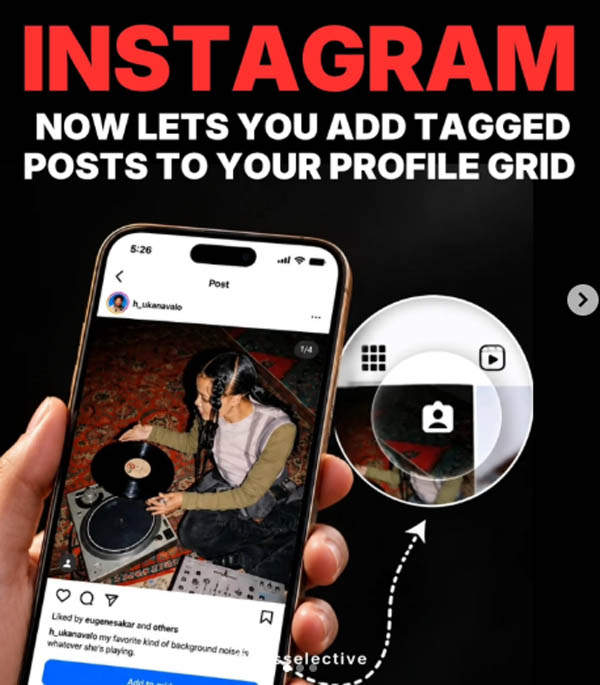
ഇൻസ്റ്റഗ്രാമിൽ മറ്റുള്ളവർ പങ്കുവെച്ച് നമ്മളെ ടാഗ് ചെയ്ത പോസ്റ്റുകൾ സ്വന്തം പ്രൊഫൈലിൽ കൂടുതൽ പ്രാധാന്യത്തോടെ പ്രദർശിപ്പിക്കാനുള്ള അവസരം ഇനി ഉപയോക്താക്കൾക്ക്. ടാഗ് ചെയ്ത പോസ്റ്റുകൾ നേരിട്ട് പ്രൊഫൈൽ ഗ്രിഡിൽ ഉൾപ്പെടുത്താൻ കഴിയുന്ന പുതിയ ഫീച്ചർ ഇൻസ്റ്റഗ്രാം മേധാവി ആദം മൊസ്സേരി ആഗോളതലത്തിൽ അവതരിപ്പിച്ചു.
ടാഗ് ചെയ്യപ്പെടുന്ന പോസ്റ്റുകൾ പ്രൊഫൈലിന്റെ പ്രധാന ഗ്രിഡിലേക്ക് ചേർക്കാൻ മൂന്ന് മാർഗങ്ങളാണ് ഇൻസ്റ്റഗ്രാം ഒരുക്കിയിരിക്കുന്നത്.
1 . ടാഗ് ചെയ്തതായി ലഭിക്കുന്ന ഡയറക്റ്റ് മെസേജ് നോട്ടിഫിക്കേഷനിൽനിന്ന് നേരിട്ട് പോസ്റ്റ് ഗ്രിഡിലേക്ക് ചേർക്കാം.
2. ടാഗ് ചെയ്ത പോസ്റ്റിലെ ത്രീ-ഡോട്ട് മെനുവിലൂടെ.
3. ‘ടാഗ്ഡ്’ ടാബിൽ പോസ്റ്റ് അമർത്തിപ്പിടിച്ചും ഈ ഓപ്ഷൻ ഉപയോഗിക്കാം.
പോസ്റ്റ് പ്രധാന പ്രൊഫൈൽ ഗ്രിഡിലേക്ക് ചേർത്താലും യഥാർത്ഥ പോസ്റ്റിന് മാറ്റമുണ്ടാകില്ല. അതുപോലെ തന്നെ പ്രൊഫൈലിലെ ‘ടാഗ്ഡ്’ സെക്ഷനിലും പോസ്റ്റ് തുടരും. പിന്നീട് പ്രധാന ഗ്രിഡിൽനിന്ന് ഒരു പോസ്റ്റ് നീക്കം ചെയ്താലും അത് യഥാർത്ഥമായി അപ്ലോഡ് ചെയ്ത വ്യക്തിയുടെ പോസ്റ്റിൽനിന്ന് ഡിലീറ്റ് ചെയ്യപ്പെടില്ല.
പുതുതായി ഗ്രിഡിൽ ചേർക്കുന്ന ടാഗ് ചെയ്ത പോസ്റ്റുകൾ ഡിഫോൾട്ടായി റിവേഴ്സ്-ക്രോണോളജിക്കൽ ക്രമത്തിലാണ് ദൃശ്യമാകുക. അതേസമയം, നേരത്തെ തന്നെ സ്വന്തം പ്രൊഫൈൽ ഗ്രിഡിന്റെ ലേഔട്ട് ക്രമീകരിച്ചിട്ടുള്ള ഉപയോക്താക്കളുടെ നിലവിലെ ലേഔട്ടിൽ ഈ ഫീച്ചർ സ്വമേധയാ മാറ്റം വരുത്തില്ല.
ക്രിയേറ്റർ കൊളാബറേഷനുകൾ, സുഹൃത്തുക്കൾ പങ്കുവെക്കുന്ന ഗ്രൂപ്പ് ചിത്രങ്ങൾ, മറ്റ് ടാഗ് ചെയ്ത കണ്ടന്റുകൾ എന്നിവ സ്വന്തം പ്രൊഫൈൽ ഗ്രിഡിൽ പ്രദർശിപ്പിക്കാൻ പുതിയ ഫീച്ചർ സഹായിക്കും. ഇതിലൂടെ ഇത്തരം പോസ്റ്റുകൾ സ്വന്തം ഫോളോവർമാരിലേക്കും കൂടുതൽ എളുപ്പത്തിൽ എത്തിക്കാനാകും. പ്രൊഫൈലിൽ കാണിക്കേണ്ട ടാഗ് ചെയ്ത പോസ്റ്റുകൾ തിരഞ്ഞെടുക്കാനുള്ള കൂടുതൽ നിയന്ത്രണമാണ് പുതിയ ഫീച്ചറിലൂടെ ഇൻസ്റ്റഗ്രാം ഉപയോക്താക്കൾക്ക് ലഭിക്കുന്നത്.
Sources:mediamangalam
Instagram is making it easier to customise how your profile looks with a new feature. Users can now bring posts they are tagged in directly to their main profile grid instead of keeping them only in the dedicated Tagged section. The feature is rolling out globally and can be useful for group photos, collaborations, and other shared moments.
How to add tagged posts to your Instagram grid
There are three ways to add a tagged post to the main profile grid. Users can do it directly from the DM notification received after being tagged, open the three-dot menu on the tagged post, or press and hold the post from the Tagged tab on their profile.
Once added, the post will appear on the main grid based on the original post’s date, with the newest content generally appearing first. However, users who have customised their profile arrangement can place the tagged post according to their preferred grid layout.
The feature also gives users the flexibility to change their minds later. A tagged post can be removed from the main grid at any time without deleting the original post. It will also remain available in the user’s Tagged section after being removed from the primary grid.
More ways to customise Instagram profiles
The new option could be particularly useful for creators who want to showcase collaborations without uploading the same content again. It can also help people bring memorable group photos, holiday pictures, and other posts shared by friends into their main profile.
Instagram has been adding more profile and content management tools in recent months. In June, the platform introduced the ability to reorder posts on the main grid, giving users more control over the arrangement of their profile. It has also added editing tools such as First Draft for Reels and Replace Audio for changing music on existing posts.
The tagged-post feature is now rolling out globally, giving users another way to decide what appears on their profiles.
http://theendtimeradio.com
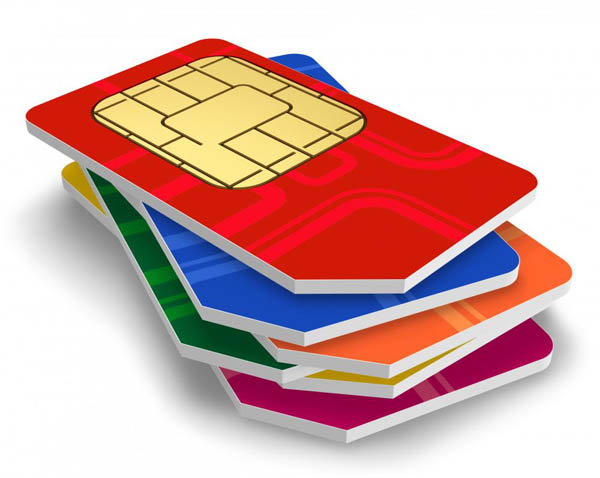
സിം കാര്ഡിന്റെ നാലുമൂലകളില് ഒരു മൂലയില് ഒരു വെട്ട് കണ്ടിട്ടില്ലേ? അതെന്തിനാണെന്ന് അറിയാമോ? ചില കാര്യങ്ങള് അങ്ങനെയാണ് നിത്യമുപയോഗിക്കുന്ന പല സംഗതികളുടെയും കൃത്യമായ ഒരു ചിത്രം നമുക്ക് അറിയില്ല. മുറിഞ്ഞുപോയ പോലെ കാണുന്ന ആ ഡിസൈനിന് പിന്നിൽ ഒരു കാരണമുണ്ട്. അത് എന്തിനാണെന്ന് 99 ശതമാനം പേര്ക്കും അറിയില്ല. അതറിയാൻ ആണെങ്കിൽ നമ്മൾ ശ്രമിച്ചിട്ടുമില്ല.
സിം കാർഡ് ഈ രീതിയിൽ രൂപകൽപന ചെയ്തതിന് പിന്നിലെ കാരണം പറയുകയാണ് സാങ്കേതിക വിദഗ്ധര്.
ഫോണിൽ കൃത്യമായി ഫിറ്റാകാൻ വേണ്ടിയാണ് സിം കാർഡിന്റെ ഒരു കോൺ മുറിച്ചിരിക്കുന്നത്. ഇതിലൂടെ സിം കാർഡ് നേരെയാണോ അതോ തലതിരിച്ചാണോ ഇടുന്നത് എന്ന് ആളുകൾക്ക് എളുപ്പത്തിൽ മനസിലാക്കാൻ സാധിക്കുന്നു. സിം കാർഡ് തലതിരിച്ചാണ് ഇടുന്നതെങ്കിൽ അത് പ്രവർത്തിക്കുകയില്ല. ഇത് മൊബൈലിൽ നെറ്റ്വർക്ക് കിട്ടുന്നത് തടയുകയും സിം കാർഡിന് കേടുപാടുകൾ സംഭവിക്കാനുള്ള സാധ്യത ഉണ്ടാക്കുകയും ചെയ്യും. SIMCards
ആദ്യകാലങ്ങളിൽ ക്രെഡിറ്റ് കാർഡിന്റെ വലിപ്പത്തിലുള്ള വലിയ സിം കാർഡുകളാണ് ഉപയോഗിച്ചിരുന്നത്. പിന്നീട് മൊബൈൽ ഫോണുകൾ ചെറുതാകുകയും മിനി മൈക്രോ, നാനോ സിം കാർഡുകളിലേക്ക് മാറുകയും ചെയ്തപ്പോഴാണ് ഉപയോക്താക്കളുടെ എളുപ്പത്തിനായി ഈ അസിമിട്രിക് ഡിസൈൻ കൊണ്ടുവന്നത്.
‘സബ്സ്ക്രൈബർ ഐഡന്റിറ്റി മോഡ്യൂൾ’ എന്നാണ് സിം കാര്ഡിന്റെ പൂര്ണരൂപം. മൊബൈൽ ഉപകരണത്തെ സെല്ലുലാർ നെറ്റ്വർക്കിലേക്ക് ബന്ധിപ്പിക്കുകയാണ് ഇതിന്റെ ചുമതല. ഇന്റർനാഷണൽ മൊബൈൽ സബ്സ്ക്രൈബർ ഐഡന്റിറ്റി (IMSI) നമ്പറും അതുമായി ബന്ധപ്പെട്ട കീകളും ഇതിൽ സൂക്ഷിച്ചുവെക്കുന്നു. ഇവയുടെ സഹായത്തോടെയാണ് ഒരു മൊബൈൽ നെറ്റ്വർക്ക് ഉപയോക്താവിനെ തിരിച്ചറിയുകയും സ്ഥിരീകരിക്കുകയും ചെയ്യുന്നത്.
ഫോൺ സ്വിച്ച് ഓൺ ചെയ്ത ശേഷം, മൊബൈൽ സിം കാർഡിലെ ഡാറ്റ വായിക്കുകയും അത് മൊബൈൽ നെറ്റ്വർക്കിലേക്ക് കൈമാറുകയും ചെയ്യുന്നു. ഈ പ്രക്രിയയ്ക്ക് ശേഷം, നെറ്റ്വർക്ക് ഉപയോക്താവിന്റെ ഐഡന്റിറ്റി പരിശോധിച്ചു ഉറപ്പുവരുത്തുന്നു. ഉപയോക്താവിന് നെറ്റ്വർക്ക് ഉപയോഗിക്കാൻ അനുമതിയുണ്ടോ എന്ന് ഇതിലൂടെ മനസ്സിലാക്കാൻ സാധിക്കും. ഈ കാരണം കൊണ്ടാണ് ഒരു കമ്പനിയുടെ സിം കാർഡിന് മറ്റൊരു കമ്പനിയുടെ നെറ്റ്വർക്കിലേക്ക് കണക്റ്റ് ചെയ്യാൻ സാധിക്കാത്തത്.
Sources:mediamangalam
Why SIM card has cut on corner: Have you ever noticed that small cut on one corner of your SIM card and wondered why it’s there? It may look like a minor design detail, but it plays a crucial role in how your phone works every day. The cut corner on a SIM card is known as a “key.” Its main purpose is to ensure that the card is inserted into a phone in the correct direction. Since SIM cards are small and can easily be placed the wrong way, this angled edge acts as a guide. It matches a specific slot shape inside the phone, preventing incorrect insertion.
Without this design, smartphone users could accidentally insert the SIM card the wrong way, which might damage the card or the phone’s internal connectors. The cut corner reduces this risk significantly. It ensures proper alignment of the metallic contacts on the SIM card with the pins inside the SIM tray which allows smooth communication between the device and the network.
A universal standard
This feature is not limited to one brand or model. The cut corner design follows global telecom standards, making SIM cards compatible with phones worldwide. Whether it’s a standard SIM, micro SIM, or nano SIM, the same angled corner exists across all formats.
A practical solution
Apart from ease of use, the design also helps manufacturers streamline production. With a fixed orientation system, device makers can design SIM slots more efficiently, reducing errors during manufacturing and improving overall reliability.
While it may seem like a small detail, the cut corner on a SIM card is a smart and practical solution. It prevents user mistakes, protects devices, and ensures seamless connectivity. The next time you insert your SIM card, that tiny angled edge will remind you how thoughtful design can quietly power everyday technology.
http://theendtimeradio.com


America’s Women: Called for Such a Time as This
The order had already been issued. An entire people faced destruction, and the man responsible held extraordinary power. Yet one...


Millions Encouraged to Open Their Bibles for Global Bible Month
Psalm 119 describes God’s Word as “a lamp for my feet and a light on my path.” Throughout November, Bible...


130 Christians Slaughtered in 3 Different Countries
The past week was one of the most fatal for Christians around the world in recent memory. From Nigeria to...


വോയ്സ് ഓഫ് ഹോപ്പ് സോഷ്യൽ വെൽഫെയർ അസോസിയേഷന്റെ ‘ബ്ലെസ് മുംബൈ 2026’ ഗോസ്പൽ മീറ്റിംഗും പവർ കോൺഫറൻസും നവംബർ 9, 10 തീയതികളിൽ
മുംബൈ: വോയ്സ് ഓഫ് ഹോപ്പ് സോഷ്യൽ വെൽഫെയർ അസോസിയേഷന്റെ (VOHSWA) ആഭിമുഖ്യത്തിൽ നടത്തുന്ന ‘ബ്ലെസ് മുംബൈ 2026’ ഗോസ്പൽ മീറ്റിംഗും പവർ കോൺഫറൻസും 2026 നവംബർ 09...


റ്റി.പി.എം പാലക്കാട് ; സുവിശേഷ പ്രസംഗവും രോഗശാന്തി ശുശ്രൂഷയും നവം. 8, 9 ന്
പാലക്കാട് : ദി പെന്തെക്കൊസ്ത് മിഷൻ ത്രിശൂർ സെൻ്റർ പാലക്കാട് സഭയുടെ നേതൃത്വത്തിൽ നവംബർ 8, 9 ന് (ഞായർ, തിങ്കൾ)സുവിശേഷ പ്രസംഗവും രോഗശാന്തി ശുശ്രൂഷയും നടക്കും....


Christian Singer Colton Dixon Says Charlie Kirk’s Assassination ‘Changed’ Him
Christian singer-songwriter Colton Dixon said the assassination of Charlie Kirk and the government’s restrictive response to the COVID-19 pandemic “changed”...
-

 us news5 months ago
Mike Winger deletes YouVersion app over ‘The Passion Translation’ controversy, urges others to ‘use caution’
-

 us news5 months ago
‘America Is Hungry’: Hundreds Born Again and Baptized as Jesus Tent Revival Sweeps the Nation
-

 Movie12 months ago
CBN’s Superbook Launches New Free Bible App for Kids: ‘The Power of God Is Released’
-

 Movie9 months ago
Hollywood Actor Jen Lilley Launching New Ministry After ‘Vision’ From Holy Spirit
-
us news15 hours ago
Millions Encouraged to Open Their Bibles for Global Bible Month
-

 National12 months ago
ഐ.പി.സി കേരള സ്റ്റേറ്റ് ഇലക്ഷൻ 2026 മാർച്ച് 9 മുതൽ
-

 world news11 months ago
പാകിസ്ഥാനിൽ പാസ്റ്റർ കമ്രാൻ മൈക്കിൾ തന്റെ മകളുടെ മുന്നിൽ വെച്ച് ക്രൂരമായി കൊല്ലപ്പെട്ടു.
-

 Movie8 months ago
Worship Leader Brooke Ligertwood Shares Stunning Testimony of Answered Prayer From Ukraine